
This Holographic Goblin Storm Proxy Deck Gets the Point
A homemade holographic Goblin Storm proxy deck shows exactly why proxying limited Secret Lair decks can be fun, practical, and worth doing carefully.
There is something extremely correct about someone seeing Goblin Storm, deciding they want the shiny goblin nonsense, and just making the deck themselves.
Not as a counterfeit. Not to sell it. Not to trick anyone. Just because the deck looks fun, the holo treatment fits the chaos, and Secret Lair products have a bad habit of turning normal excitement into a limited-supply scramble.
The official Secret Lair Commander Deck: Goblin Storm was a $149.99 product built around Zada, Hedron Grinder, storm spells, goblin tokens, foil borderless cards, and those ridiculous panoramic Mountains. The deck had the kind of art direction that makes people want the object, not just the list. That is exactly where proxies become interesting.
Because if the real product is hard to get, expensive after the drop, or just not worth chasing, a good personal proxy version can still let you enjoy the idea. And honestly, that is a much healthier answer than feeding every sold-out product into the resale machine.
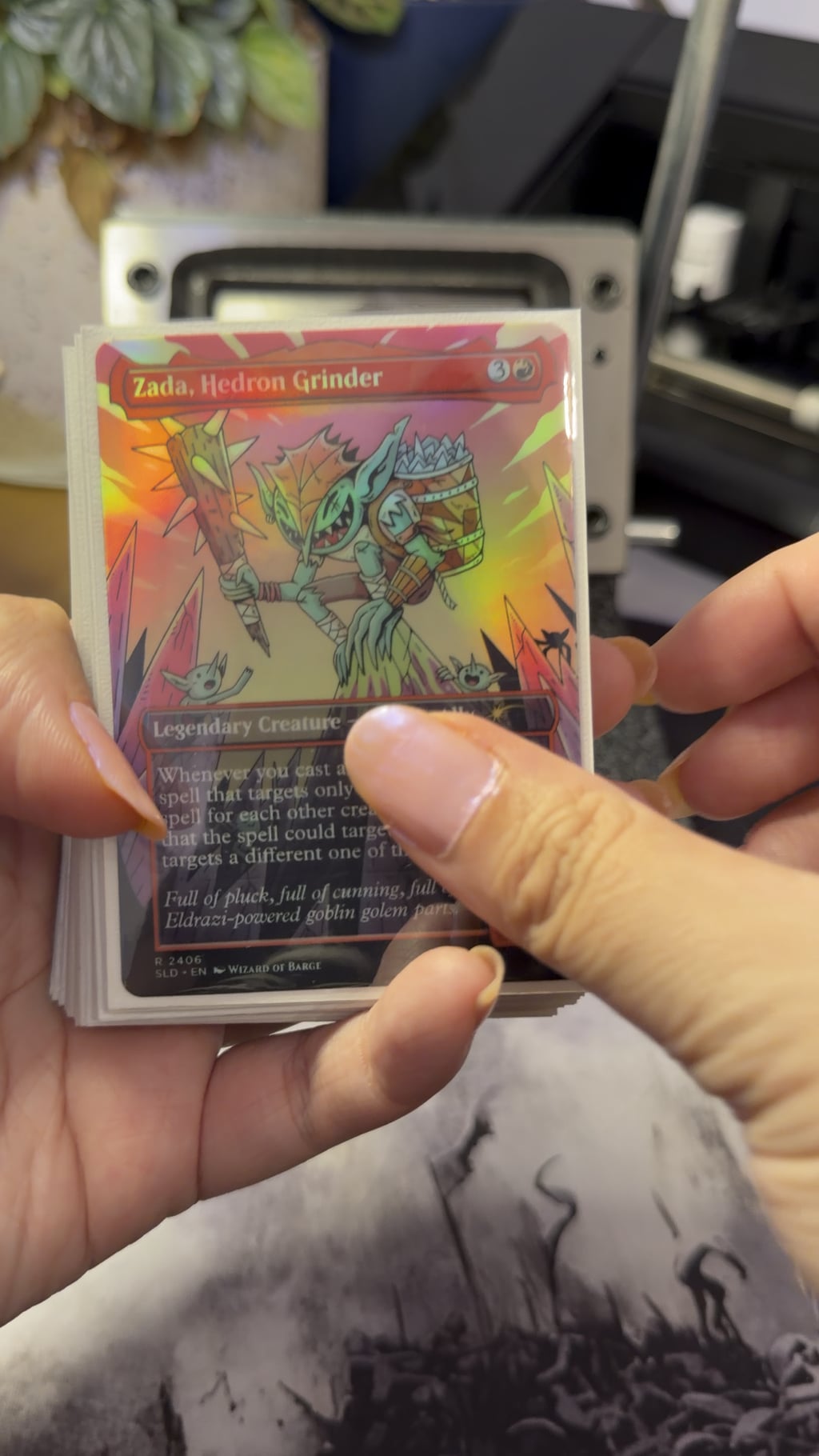
This Is the Right Kind of Proxy Project
Some proxies are purely practical. Print the staple, test the deck, avoid spending $70 before knowing if the card is even good in the list.
This one feels different. This is a proxy project that exists because the physical version is part of the appeal. Goblin Storm is not just “a mono-red Commander deck.” It is a whole Secret Lair presentation: Wizard of Barge art, foil borderless cards, themed Mountains, goblin tokens, and a big silly storm-count vibe.
That makes the homemade holo version feel less like a cheap substitute and more like a fan-made answer to the product itself.
I like that. Proxying is at its best when it keeps people playing and creating instead of sulking over scarcity. If you miss a limited drop, hate the aftermarket price, or simply do not want to pay collector-product money for a casual deck, making your own version is a completely reasonable response.
The Workflow Behind It
The finished deck was not just printed straight from one site. The process used MPCFill to make the XML file, then Proxxied to handle the images and PDF setup. The images were downloaded, upscaled with AI, then put back into Proxxied for printing.
That is a very proxy-maker workflow: one tool for the card pool, one tool for sheet layout, one extra step for image quality, then the final print file.
| Step | Tool or material | Why it matters |
|---|---|---|
| Card file setup | MPCFill | Useful for building a card list and pulling proxy-ready images. |
| Print layout | Proxxied | Used to prepare the final printable PDF. |
| Image cleanup | AI upscaling | Can improve sharpness, but it needs color checking. |
| Paper | UOKHO holographic sticker paper | The holo effect comes from the printable sticker material. |
The upscaling part is worth treating carefully. Upscaling can make a card face sharper, but it can also shift color. That is not theory. It is exactly the kind of thing people run into when testing tools like Upscayl or other AI upscalers. The card looks better on screen, then the print comes out slightly off.
For a deck like Goblin Storm, that may be acceptable. The holo finish already changes how colors behave. But if you are trying to match a real card closely, print one small test before trusting the whole batch.
The Holographic Sticker Paper Is the Star
The paper used was UOKHO holographic sticker paper from Amazon. That makes sense for a project like this because Goblin Storm already wants to be loud.
A holo sticker paper route is different from printing directly onto cardstock. You are printing the card face onto adhesive vinyl, then applying it to a backing card or stock. That gives you a shiny finish without needing to blank real foils or mess with foil-transfer methods.
It also adds the usual sticker-method problems: alignment, surface feel, thickness, scratching, and whether the adhesive layer plays nicely over time.
For a full Commander deck, that matters. One sticker proxy is easy to forgive. A full stack of sticker-layer cards needs more testing, especially if the backing stock is thick.
If the project is mostly about the showpiece look, though, this method makes sense. The holo effect is the point. For more normal cardstock or direct-print testing, the better rabbit hole is MTG Proxy Cardstock.
Cost Per Card: The Holo Paper Is Surprisingly Cheap
The UOKHO 20-sheet holographic sticker paper listing was $8.99 at the time checked. That works out to about $0.45 per sheet.
| Calculation | Amount |
|---|---|
| Sticker paper price | $8.99 for 20 sheets |
| Cost per sheet | About $0.45 |
| Cards per sheet assumption | 9 card fronts |
| Sticker-paper cost per card front | About $0.05 |
| Sticker-paper cost for 100 card fronts | About $5.40, using 12 sheets |
That is just the holographic sticker paper. It does not include printer ink, backing cards or cardstock, sleeves, failed prints, cutter blades, shipping, tax, or the value of your time.
Still, that is the interesting part. The shiny surface itself is not expensive. The expensive part is the workflow around it: getting the file right, printing cleanly, applying the sticker without bubbles, cutting accurately, and not ruining sheets while testing.
If you only want to recreate the official deck’s most special-looking pieces, the math gets even better. The official product included 12 foil borderless cards, 22 foil borderless Mountains, and 4 foil Goblin tokens. That is 38 holo-style pieces. At 9 per sheet, you are looking at 5 sheets of sticker paper, or roughly $2.25 in holo paper before ink and backing.
That is why proxy making is so hard to ignore. The material cost can be tiny compared with what the official or aftermarket product costs. The tradeoff is effort.
The Actual Value Is Not Just Saving Money
It would be easy to reduce this whole thing to “Secret Lair expensive, proxy cheaper.” That is true, but it misses the fun part.
This is not just a budget workaround. It is a custom build of a deck that already has a strong visual identity. The holo finish turns the whole thing into a more personal version of the product.
That matters. A lot of proxy projects are more satisfying because they are yours. You pick the finish. You pick how shiny to go. You decide whether the whole deck gets the treatment or only the showpiece cards. You decide whether the goal is official-looking, obviously custom, or just table-fun.
That is the version of proxying I like most. Not “pretend this is real.” More like “this is my playable version of a thing I wanted.”
The Size Issue Is the One Tiny Trap
One useful detail from the discussion was about cards printing slightly smaller than normal. That can happen when the PDF or printer settings scale the page instead of printing at actual size.
The fix is usually simple: make sure the print settings are set to “Actual Size” instead of fit-to-page or automatic scaling.
That tiny setting matters more than it sounds. A 1 or 2 percent shrink is hard to notice on a sheet, but very easy to notice once the card is cut and put beside a real Magic card.
If you are using Proxxied or any PDF layout tool, make one printed test sheet before committing to the full deck. Cut one card, put it over a real card, and check the size before wasting the whole batch.
For layout and cutting tools, MTG Proxy Tools is where those comparisons belong.
What I’d Watch Before Making the Whole Deck
I like this project, but I would still treat it as a specialty finish, not an automatic default for every card.
Holographic sticker paper can be beautiful, but it can also scratch, curl, shift color, or feel a little too “craft sticker” if the backing stock is not right. It also makes color judging more complicated because the rainbow surface changes under light.
| Test | Why it matters |
|---|---|
| One dark card | Checks whether black borders stay readable over the holo surface. |
| One red-heavy card | Goblin decks need reds that do not turn muddy. |
| One detailed art card | Shows whether upscaling helped or just changed the texture. |
| One Mountain | The panoramic land look is a huge part of Goblin Storm’s appeal. |
| One sleeved stack test | Checks thickness and shuffle feel before doing the whole deck. |
| One scratch test on a failed print | Shows how careful you need to be before sleeves. |
That is the boring part of making something cool. The first video can look great, but the full deck still needs the practical tests: does it fit in sleeves, does it shuffle, does it scratch too easily, does the deck get too thick, and does the holo make text harder to read?
Why Goblin Storm Is the Perfect Candidate
Some decks should not be all-holo. They get visually messy, text becomes annoying, and the finish distracts from the cards.
Goblin Storm can get away with it.
The deck is already loud. It is already chaotic. It is already built around red cards, tokens, spell chains, and a pile of goblin nonsense. A holographic finish fits the energy.
This is not the same as making a clean control deck in rainbow foil. Goblin Storm wants to look like someone cast too many spells and the table started vibrating. Holo paper gets that mood right.
And if the official product leans on foil borderless cards and special Mountains, a homemade holo version is not random. It is chasing the same feeling through a cheaper, more personal route.
When I’d Use This Method
I would use this for special decks, not every deck.
- A Secret Lair-inspired Commander deck
- A custom commander project
- A few flashy pet cards
- Tokens that deserve to look ridiculous
- A cube prize card or special alternate version
- A deck where the finish matches the theme
I would not use this for fast playtesting. It is too much work for that. If the goal is just “does this list function,” print normal paper proxies first. Holo sticker paper is for when the deck has already earned the shine.
If you are comparing normal home printer routes before jumping into specialty finishes, start with MTG Proxy Printers. Holo paper is a fun layer, but the printer still has to put down clean color first.
What This Project Gets Right
The best thing here is the attitude.
Someone wanted the Goblin Storm deck, liked the holo idea, and made something worth sharing. That is the good side of proxy culture. It is creative. It is practical. It is budget-aware. It is not asking permission from a sold-out product page.
There are still limits. The result should be used honestly. Nobody should sell these as real. Nobody should trade them as official Secret Lair cards. Nobody should take them into sanctioned events.
But for casual Commander? This is exactly where proxies shine.
The table gets the deck. The player gets the fun version they wanted. The game happens. That is the whole point.
Bottom Line
This holographic Goblin Storm proxy deck is a great example of proxies being more than cheap copies.
Yes, the cost matters. The holo paper itself can come out to around five cents per card face before ink, backing, sleeves, and mistakes. That is ridiculous compared with chasing a limited Secret Lair product after the fact.
But the better point is that the proxy version keeps the joy of the idea alive. Goblin Storm is a loud, weird, shiny deck concept. Making it at home with holographic sticker paper feels completely on theme.
I would not use this method for every deck. I would not even use it for every card in every deck. But for Goblin Storm, it makes sense. Print a small test, use Actual Size, check the holo paper with your printer, sleeve the results, and only then commit to the whole goblin pile.
If a product is limited, expensive, or just annoying to get, that should not stop casual players from enjoying the design. That is what honest proxies are for.
Inspired by: Finally got around to making the Goblin Storm deck by u/forgottenspells.
Comments (0)
Join the discussion. Log in or create an account to comment.